KKInstall notes
Installing KingKong safely: the Android steps and the iPhone question
KingKong is not in Google Play. What each Android install screen means, why you should switch unknown sources back off, and why we have seen no iPhone build.
KingKong Casino is not in Google Play or the App Store. On Android it comes as an APK file that you install by hand. That is normal for Malaysian app casinos, but it means nobody has checked the file before it reaches your phone. This page explains the screens you will see and how to keep the risk low. It does not link to the app, and this site hosts no app files.
Get the link only from the agent who issues your KingKong ID. If you do not have one yet, ask for a KingKong game ID and install link, then read the steps below before you tap anything. For what the app contains, see the KingKong Casino overview.
Android, step by step
1. The install prompt
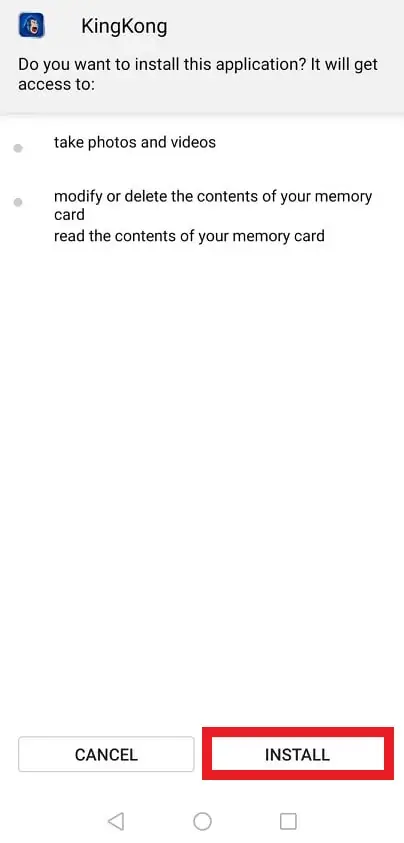
Once the file has downloaded and you open it, Android shows the app name, KingKong, and a list of what it wants: take photos and videos, and modify, delete and read the contents of your memory card. A game has no obvious need for the camera. Newer Android versions ask for each permission when the app first uses it, so you can say no and see if the game still works.
2. "Install blocked"
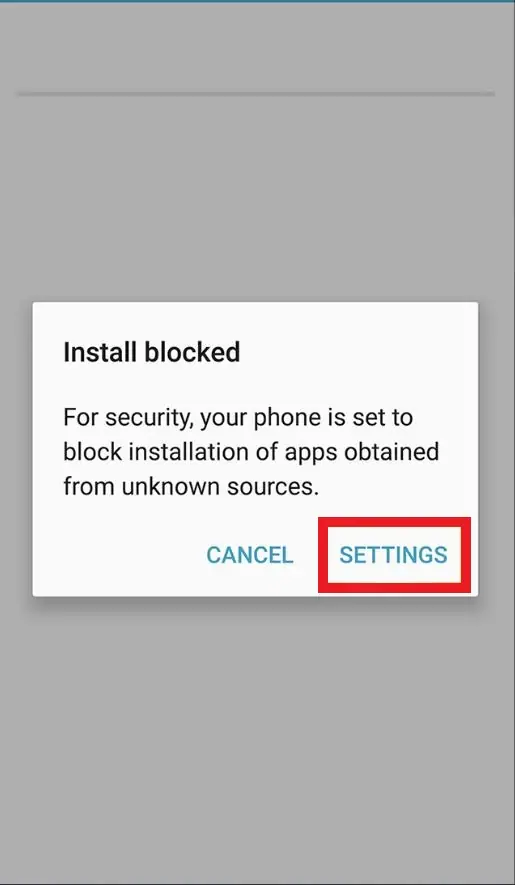
On a phone that has never side-loaded anything, Android stops the install with an "Install blocked" message. Tapping SETTINGS takes you to the switch that allows it.
3. Allowing unknown sources
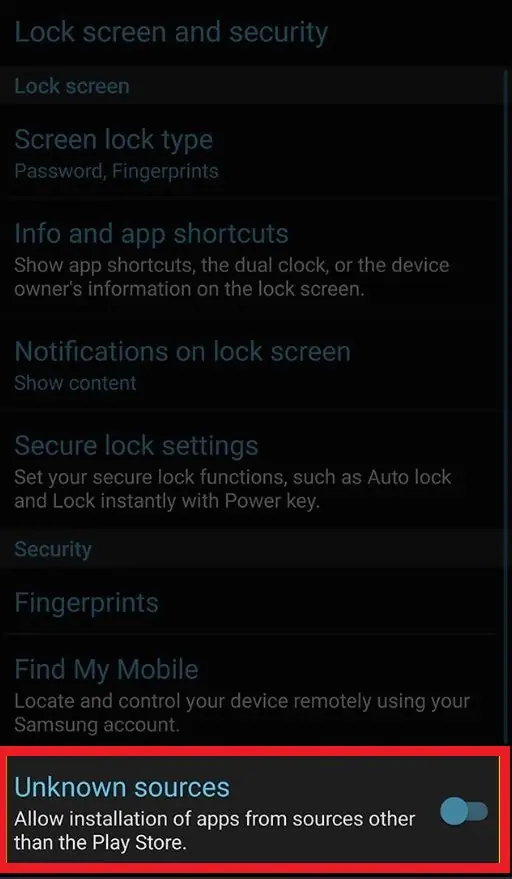
This capture comes from an older Samsung phone, where the setting is a single "Unknown sources" switch under Lock screen and security. It lets any app install other apps. On Android 8 and newer the setting is per app instead: you allow your browser or file manager to "Install unknown apps", which is safer because only that one app gets the right.
Whichever version you have, turn the permission off again once KingKong is installed. Leaving it on means a malicious link in a browser or a chat app could install something without further warning.
4. The login screen
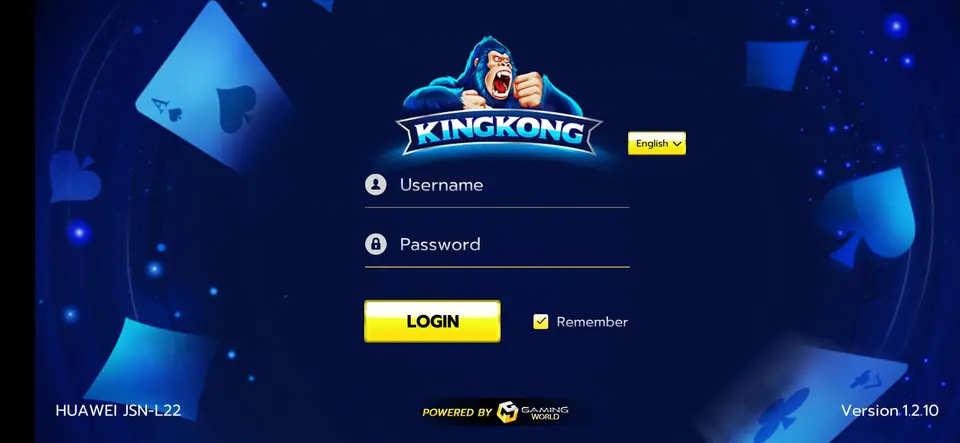
The picture at the top is what you should see after installing: the gorilla logo, Username and Password fields, a LOGIN button and a Remember box. Along the bottom are the phone model on the left, "Powered by Gaming World" in the middle and "Version 1.2.10" on the right. That version number comes from an old capture, so expect a newer one today. There is no sign-up button. The username and password come from your agent.
What about iPhone?
The old page had an "IOS Version" button that led nowhere and a line saying iOS devices are not compatible. We have not seen an iPhone build of KingKong.
If an agent does offer one, it would be installed the way other app casinos are on iPhone: as an enterprise app outside the App Store. iOS will first show "Untrusted Enterprise Developer". To open it you go to Settings, then General, then VPN & Device Management, pick the developer's name and tap Trust. Apple's own warning on that screen explains what it means: trusting a developer lets their apps run on your phone and may give them access to your data. The certificate is often issued to a company that has nothing to do with the game, and Apple revokes these certificates, after which the app stops opening until you install a new one.
Safety checks
- Get the file only from the agent you already deal with, not from ads, groups or search results.
- Keep Android or iOS up to date so known security holes are closed.
- Never type your banking TAC or online banking password into a game app, and never send it to an agent. Top-ups do not need it.
- Uninstall the app if it starts showing pop-ups outside the game or asks for new permissions.
Our note on gambling scams and bad agents covers fake links and other tricks. Install notes for the other platforms are in the install notes hub.
Only install KingKong if you are 18 or over, and remember that online gambling is restricted in Malaysia. Set yourself a spending cap first; the responsible gaming page has a few ways to make it stick.
Questions from the field
Can I download KingKong from this page?
No. This site hosts no app files and links to none. Ask the agent who gives you your KingKong ID for their current link.
Why does the app want access to photos and the memory card?
The install prompt lists those permissions but the app does not say why. Many of these apps use storage for game files. You can refuse or remove permissions later in Settings and see whether the game still runs.
Is there a KingKong app for iPhone?
The old page offered no working iPhone link and said iOS was not supported. If someone offers you one, it would be an enterprise-signed app, with the risks described below.
18+ only. Real-money games; online gambling is restricted in Malaysia. Never top up money you need, and stop if it stops being fun. Responsible gaming.